Installing a plugin, setup program
Run the setup program, the program will ask for which playbook version the plugin should be installed.
If you do not see your playbook version then browse to the playbook program folder and install the plugin there.
The playbook program folder is the folder where the playbook program is installed. To find it you search for the file Play*.exe with the windows search function.
Usually you will find a folder/directory like this.
c:\program files\jes-soft\Hockey Playbook 010\
Installing a plugin, zip file
To install a plugin
download the plugin zip file and extract the contents to the playbook program folder.
To unzip the plugin file and be able to extract it contents you will need a unzip program.
A *.ZIP file is a file which contains one or more compressed files. Compression is very useful in keeping download times low.
To uncompress/unzip a zip file you will need a Zip/Unzip program. Zip programs can be found on the Internet, I found several using the following links:
www.tucows.com
www.winzip.com
Some zip programs are free others are shareware.
The playbook program folder is the folder where the playbook program is installed. To find it you search for the file Play*.exe with the windows search function.
Usually you will find a folder/directory like this.
c:\program files\jes-soft\Basketball Playbook 010\
After you have extracted the files in the program folder there should be a new file called
myplugin.plg and a new folder/directory called
myplugin containing the new courts/fields. (
myplugin should be replaced with the name of the plugin that was downloaded).
Activate a plugin
You can verify the installation of a plugin by starting the playbook program and check the Special menu, it will now have a new link to the plugin window.

To activate a plugin, select the desired plugin from the list and make sure that the active Yes option is chosen.
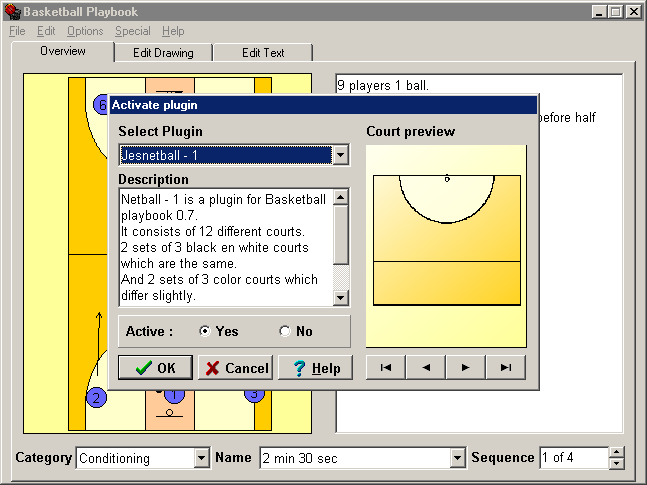
After activating the plugin the new courts/fields can be selected from the court tab on the edit drawing tab


 Baseball
 Basketball
 Football
 Hockey
 Soccer
 Volleyball
 Water polo
